
Download Maester Blog Creator – AI‑Powered Content Generation Tool for Fast, Secure Blog Writing
Why Maester Blog Creator Is Changing the Way We Write Blogs
In a world where fresh, SEO‑friendly content decides the fate of a website, Maester Blog Creator arrives as a game‑changing AI‑driven solution. This cloud‑based application lets writers, marketers, and small business owners generate complete blog posts in minutes rather than hours. By simply feeding the tool a title, industry keywords, and a preferred tone, Maester’s neural engine drafts coherent, engaging paragraphs that are ready for publishing or easy to tweak for a personal touch. The platform’s intuitive dashboard removes the steep learning curve typical of AI writing assistants—no coding, no complex prompts, just a clean, step‑by‑step workflow that feels like a conversation with a seasoned copywriter.
Beyond speed, Maester emphasizes security and privacy. All data is encrypted in transit, and the service adheres to GDPR standards, ensuring that proprietary ideas or client‑specific keywords never leak. The tool also integrates natively with Google accounts, providing a single‑sign‑on experience that saves time while maintaining high security. Whether you’re a solo blogger looking to post twice a week or an agency handling dozens of client blogs, Maester offers a scalable solution that grows with your content calendar.
What truly separates Maester from other generators is its template system. Users can save custom configurations—like a “tech‑review tone” or “financial‑analysis structure”—as reusable templates. This feature cuts repetitive setup time dramatically and guarantees consistent brand voice across multiple posts. Coupled with a built‑in activity history that tracks every generated draft, Maester equips you with both creative freedom and analytical insight, making it a must‑have tool for anyone serious about content productivity.
Key Features, Installation, and Compatibility All in One Place
- AI‑Driven Content Engine: Generates full‑length blog posts based on title, industry, keywords, and tone.
- Customizable Templates: Save and reuse configurations for different niches or brand voices.
- Section‑Level Control: Force specific content into intro, body, or conclusion sections for precise structuring.
- Tone Selector: Choose from professional, casual, persuasive, or technical tones with a single click.
- Google Account Integration: Secure single sign‑on and easy access to saved drafts across devices.
- History Tracker: View, edit, or reuse past generations, helping you monitor productivity.
- Feedback Loop: Built‑in rating system that feeds user insights back into the AI for continuous improvement.
Getting started with Maester Blog Creator is straightforward. Visit the official website, click the “Download” button for your platform, and follow the on‑screen wizard. The installer is lightweight (under 120 MB) and requires Windows 10 or later, macOS 11 (Big Sur) or later, and the latest Android 11/iOS 14 for mobile versions. After installation, launch the app and sign in with your Google credentials; the process takes less than a minute.
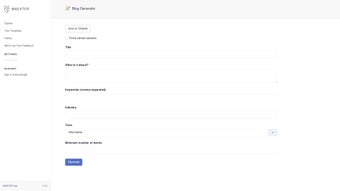
Once logged in, the dashboard presents four main tabs: New Post, Templates, History, and Settings. To create a post, select “New Post,” type your headline, pick the industry from a drop‑down list, input up to five focus keywords, and choose a tone. The AI then produces a draft in under 30 seconds. You can edit any section directly, apply a saved template, or ask the engine to rewrite a paragraph for a different tone.
Maester supports Windows, macOS, Android, and iOS, making it a truly cross‑platform solution. All data is stored in encrypted cloud storage, so you can switch devices without losing drafts. System requirements are modest: 4 GB RAM, 500 MB free disk space, and an internet connection for AI processing. The software also offers automatic updates, ensuring you always have the latest security patches and feature enhancements without manual intervention.
Pros, Cons, and Frequently Asked Questions
Pros
- Rapid content generation saves hours of manual writing.
- Highly customizable templates keep brand voice consistent.
- Secure Google sign‑in and GDPR‑compliant data handling.
- Cross‑platform availability (Windows, macOS, Android, iOS).
- Built‑in history tracker for easy reuse of past drafts.
Cons
- Requires an active internet connection for AI processing.
- Advanced tone nuances may need manual fine‑tuning.
- Free tier limits the number of monthly generations.
Frequently Asked Questions
Is Maester Blog Creator free to use?
Maester offers a free tier that includes up to 10 blog generations per month. For unlimited access and premium features such as bulk template export, a paid subscription starting at $19.99 per month is required.
Can I export the generated blog to WordPress?
Yes. Maester provides a one‑click “Export to WordPress” button that creates a draft post in your WordPress site via the REST API, preserving formatting and metadata.
How does Maester ensure the content is SEO‑friendly?
The AI model is trained on top‑ranking articles and incorporates keyword density, meta‑description suggestions, and internal linking recommendations automatically.
Is my data safe when I use the cloud‑based AI?
All communications are encrypted with TLS 1.3, and stored drafts are saved in GDPR‑compliant servers. Users can also opt for local‑only mode, which disables cloud storage.
Can I customize the AI’s writing style beyond the preset tones?
Yes. Advanced users can provide a “style guide” document that the AI references, allowing fine‑grained control over vocabulary, sentence length, and brand terminology.
The overall experience with Maester Blog Creator is highly positive, especially for teams needing fast, consistent content. Minor limitations are outweighed by its productivity boost.
Final Verdict – Should You Download Maester Blog Creator Today?
For anyone who struggles with writer’s block, tight deadlines, or the need to maintain a uniform voice across multiple blogs, Maester Blog Creator offers a compelling, secure, and AI‑enhanced solution. Its blend of rapid generation, template flexibility, and cross‑platform support makes it a solid investment for freelancers, agencies, and in‑house marketing teams alike. While the free tier is generous enough for occasional use, power users will quickly see the value in the premium subscription that removes generation caps and unlocks advanced customization.
Ready to accelerate your content pipeline? Download Maester Blog Creator now, sign in with your Google account, and start producing publish‑ready blog posts in minutes. Experience the future of blogging—secure, fast, and intelligently personalized.



.png)



